
What if you could ask your Power BI model to correct itself?
At Ignite 2025, Microsoft released the Power BI Modeling MCP, an extension that connects AI agents directly to semantic models. Instead of editing object by object, you simply describe what you want in natural language. The agent handles the rest.
What is the MCP?
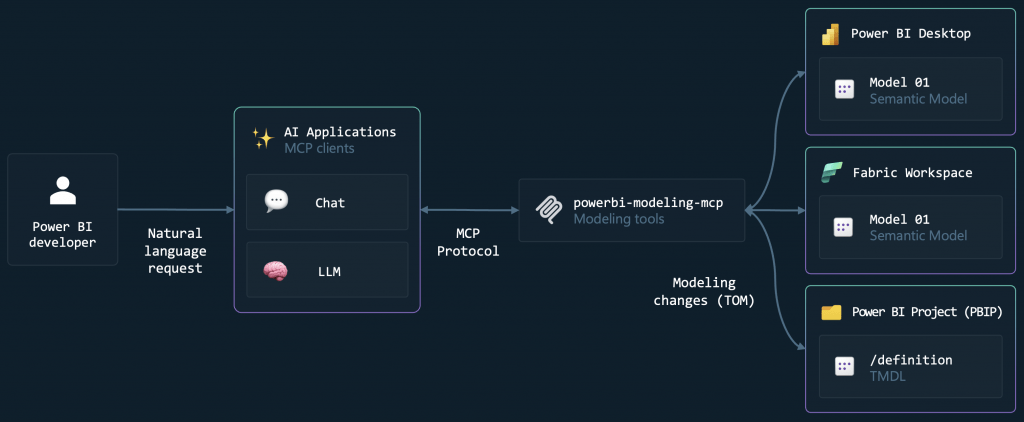
The Model Context Protocol (MCP) defines how AI agents communicate with external tools. It effectively acts as a universal translator: the user writes in natural language, the LLM converts it into API calls, and Power BI executes the changes.
The Power BI Modeling MCP implements this protocol to create a direct channel between GitHub Copilot and semantic models. Communication occurs through the same APIs that Power BI Desktop uses internally (TOM for metadata, ADOMD.NET for queries), now controlled through natural language instead of clicks.
What changes in practice?
Let’s imagine these day-to-day scenarios:
Consistency of naming conventions
“Analyze the naming conventions in my model and suggest renamings to ensure consistency.”
The agent scans tables, columns, and measures, identifies patterns and inconsistencies, and then applies the requested corrections. It is possible, for example, to ask it to analyze a specific table and replicate the pattern across the rest of the model.
Automatic documentation
“Add descriptions to all measures, columns, and tables, explaining the DAX logic in simple terms.”
That documentation nobody ever has time to do? Solved with a single prompt. The agent analyses the DAX code and generates descriptions that are understandable for business users.
Translations and internationalization
“Generate a French translation for the model, including tables, columns, and measures.”
Multi-language support which normally requires extensive manual configuration, now handled automatically.
DAX queries and validation
“Execute this DAX query and analyse the performance metrics.”
The agent not only executes queries but can also clear the cache, measure execution times, and identify potential performance issues.
…
The power of bulk operations
Where this tool truly becomes valuable is in bulk operations. Renaming hundreds of objects, applying RLS rules across multiple tables, creating translations for entire models, generating documentation, and so on.
What previously required hours of repetitive work now takes seconds — and with fewer human errors.
The list of available operations is extensive: management of tables, columns, measures, relationships, partitions, hierarchies, calculation groups, roles, perspectives, translations, and much more.
Connection to different sources
The MCP Server connects to three types of sources:
Power BI Desktop: Locally opened .pbix files. Just say “Connect to ‘[File Name]’ in Power BI Desktop” and the agent locates the corresponding Analysis Services instance.
Fabric Workspaces: Semantic models in the cloud. “Connect to semantic model ‘[Name]’ in Fabric Workspace ‘[Workspace]’” and you’re connected to the remote model.
PBIP/TMDL files: For those working with Power BI Projects and versioning models in Git. The agent can open TMDL folders, make changes, and save them back—all without opening Power BI Desktop.
This last option is particularly interesting for teams that have adopted DevOps practices. It becomes possible to use CI/CD workflows that rely on MCP to automatically validate or transform models.
Installation
The simplest way to get started:
- Install VS Code
- Install the GitHub Copilot and GitHub Copilot Chat extensions
- Install the Power BI Modeling MCP extension
The MCP server becomes available automatically within Copilot Chat.
For those who prefer other MCP clients (Claude Desktop, for example), manual installation is also available. Simply download the executable and register the server in the client of your choice.
Is it worth trying?
For those who work with Power BI modeling regularly, Power BI Modeling MCP eliminates repetitive work and unlocks possibilities that simply didn’t exist before. The ability to describe intentions instead of executing them manually changes the way we interact with models.
It does not replace technical expertise — you still need to know what you intend to do and validate the results. But it frees up time for the work that truly matters.
Power BI modeling is evolving. This tool is a first step in an interesting direction.
In the B2F, we closely follow the latest developments in the Microsoft ecosystem. If you want to explore Power BI Modeling MCP or need support with Power BI and Fabric, talk to us!